Adelphi Mobile App
The new Adelphi Mobile App puts the tools, information and services you use every day in one place.
Designed for students, faculty, staff and all members of the Adelphi community, the app simplifies daily campus life by offering instant access to essential services with a single sign-in.
Get the New Adelphi App
Starting August 2026, the Adelphi Mobile app is completely new—not just an update to our existing one. You can safely delete previous versions of the Adelphi App and AU2Go app from your device and download the new version. If you run into any issues or have suggestions, please use the built-in feedback and bug submission form to reach our development team.
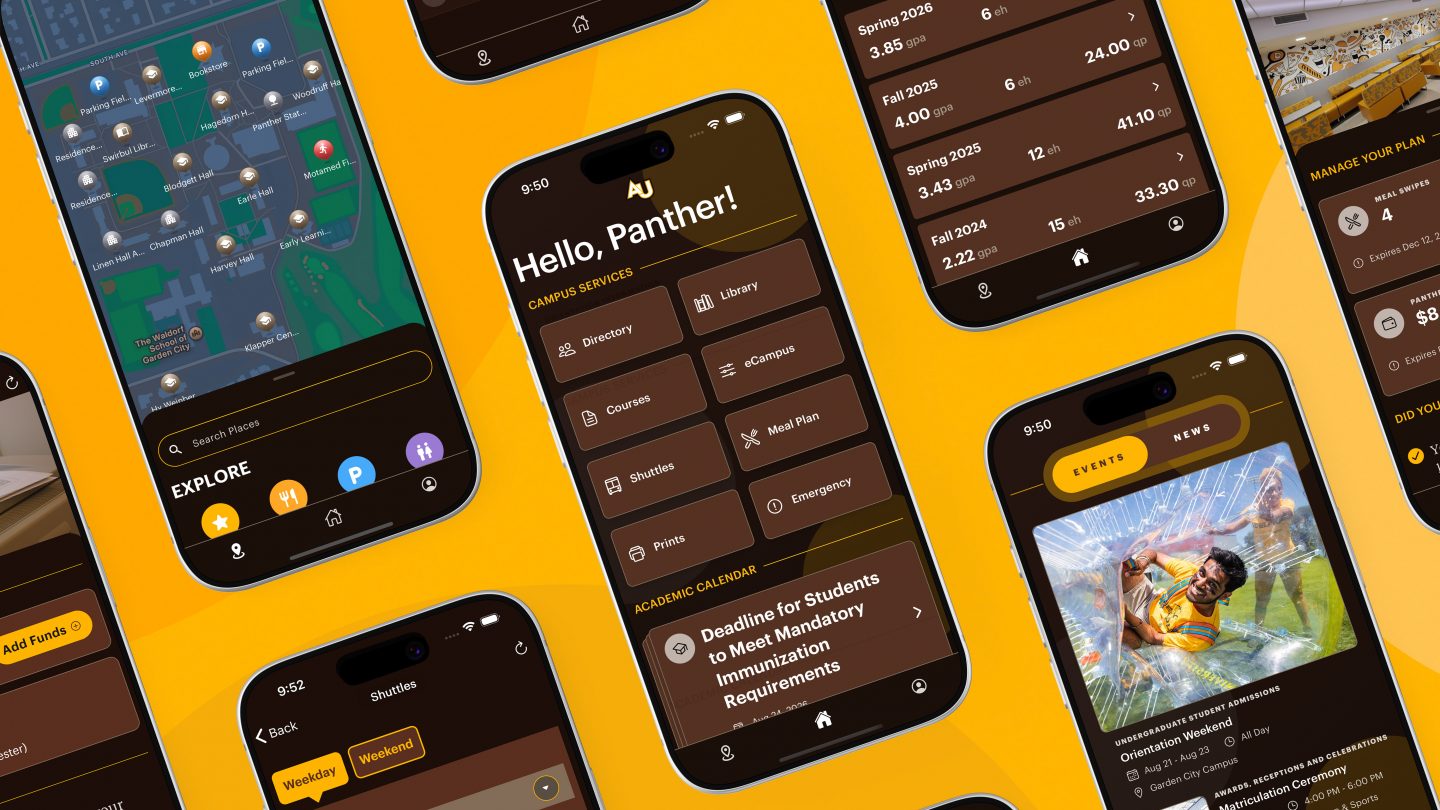
Key App Features and Highlights
Sign in once with your Adelphi credentials to access the information and services available to you:
- Courses: View your enrolled classes and quickly access your faculty advisor’s information.
- Digital ID and QR Code: Access your official digital Adelphi ID with a built-in QR code to check out library materials or check in to select campus events.
- Meal Plan Balances: Instantly check your remaining meal swipes and Panther Dollars for on-campus dining.
- Printing Balances: Check your Pcounter balance to see how much of your on-campus printing allotment you have remaining.
- Key Dates and Deadlines: See the next upcoming academic date right on your home screen—with quick access to registration periods, add/drop deadlines, midterms and final exams.
- Calendar Syncing: Push important academic dates directly into a personal calendar.
- News and Events Toggle: Switch between the latest Adelphi news and upcoming events right from the home screen, with quick links into the full lists.
- News Notifications: In your Account Settings, turn on news alerts to be notified as soon as a new Adelphi story is published.
- Find Events That Interest You: Search events by title and narrow the list by audience, category or tag.
- Event Notifications by Category: In your Account Settings, turn on event alerts and choose the categories you care about—or select “all” for everything. You’ll get a heads-up for upcoming events in your selected categories.
- Community Search: Quickly look up students, faculty and staff by name or department without searching through external websites or emails.
- Easy Contact: Call, email, or message individuals or departments directly from their directory listing.
- Department and Office Hours: Displays office locations and operating hours prior to visiting.
- Live Library Status: View real-time library operating hours and closure notifications or ask a librarian a question.
- Catalog Search: Search books, academic journals and electronic resources directly from a mobile device.
- Reserve a Study Space: Check current availability and reserve a collaboration studio for group work.
Designed for the Garden City, NY campus, allowing users to tap any building to view departments, offices and dining options.
- Self-Guided Tour: Future Panthers can take a curated walking tour.
- Find Your Way: Allow location access to see your current location on the campus map and navigate to nearby buildings and campus resources.
- Points of Interest: Easily locate libraries, computer labs, student lounges and parking areas.
- Academic Records: Access semester grades, transcripts and academic records natively without launching a web browser.
- Course Registration: Add, drop and plan courses directly from the app.
- Holds and To-Dos: View active holds and administrative to-do items to resolve blocks before registration windows open.
- Live Shuttle Timetables: Access Adelphi’s dynamic shuttle schedules directly in the app, with up-to-date departure times for campus stops.
- Custom Filtering: Filter by route, day and stop to navigate weekday, weekend and late-night service.
- Direct Public Safety Access: Offers one-tap contact numbers to report emergencies or crimes across all Adelphi’s New York locations in Garden City, Hauppauge, Manhattan and Hudson Valley.
- Weather and Closure Alerts: Dedicated phone lines and notification alerts for campus-specific weather advisories and emergency closure updates.
App Customization and Support
- “Ask Adele” AI Assistant: Features a built-in chatbot that provides real-time answers to questions regarding university services and information.
- Light and Dark Modes: Choose between light mode, dark mode or Adelphi’s signature dark brown theme.
- Tailored Notifications: Personalize your push alerts by toggling notifications independently for the Academic Calendar, Events and News.
- In-App Feedback: Send direct feedback or submit feature requests straight to the development team.
Set a Passkey for the Adelphi App
With a passkey, you sign in to the Adelphi app using Face ID, your fingerprint, or your phone’s PIN instead of your password.
Before you begin, make sure you’re using a recent version of iOS and Safari.
- Open Settings and select your name, iCloud, Saved to iCloud and Passwords. Turn on “Sync this iPhone.”
- Go to Settings, select General and then AutoFill & Passwords. Turn on “AutoFill Passwords and Passkeys” and make sure “Passwords” is selected.
- Open Safari and sign in to Microsoft Security Info.
- Select “+ Add sign-in method”, then “Passkey” and “Next.”
- When prompted, make sure the passkey is being saved to iCloud Keychain. Select “Continue” and confirm with Face ID or your passcode.
- Enter a name for the passkey. Select “Next,” then “Done.”
Before you begin, make sure you’re using Android 14 or later and that your default browser is Chrome or Microsoft Edge. Firefox does not support passkeys for Microsoft sign-in.
- Open Settings, search for Passkey and select Passwords, passkeys and autofill. Make sure Google is selected. (Android 14 and above only)
- Open Chrome or Edge and sign in to Microsoft Security Info
- Select “+ Add sign-in method”, then “Passkey” and “Next.”
- When prompted, select “Google Password Manager.” Select “Continue” and confirm with your fingerprint, face or PIN.
- Enter a name for the passkey. Select “Next,” then “Done.”
Using the Android Beta Version?
If you downloaded our Android app through an early testing link, you may see a “Beta” label next to the app name in the Google Play Store. This means you’re currently on the beta version rather than the official release.
You don’t need to do anything—you’ll continue to receive all the latest updates automatically. But if you’d prefer to switch to the official version of the app, you can leave the beta program at any time.
In the Google Play Store, switch to the official app:
- Open the Google Play Store app
- Tap your profile icon in the top-right corner
- Select “Manage apps & devices”, then tap the “Beta” tab
- Tap our app in the list
- Scroll to the “You’re a beta tester” section and tap “Leave”
- Reinstall the app